Event forecast
Your products
Expected event activity
Tip: For a cautious first estimate, use a lower conversion rate than you hope to achieve. The slower-day scenario below automatically tests 70% of your expected conversion rate.
Profit is before taxes and owner wages. Product cost covers units sold; inventory cost to carry is shown separately. Card transaction share is estimated from card revenue share, assuming equal average basket sizes. Planning estimates only. Actual event traffic, conversion, product mix, fees, taxes, weather and other conditions can materially change results.
Compare up to 3 events
Change the inputs above, calculate the next event, then save it here. Your browser keeps these comparison cards locally on this device. Saving a fourth event replaces the oldest. Use Clear comparison to remove them.
First Vendor Event Packing Checklist
A simple printable checklist for payments, booth setup, inventory, emergency supplies, personal items, and the final checks to make before leaving home.
What’s inside
✓ Payments & business essentials
✓ Booth & display supplies
✓ Product & inventory check
✓ Tools & emergency kit
✓ Event-day personal items
✓ Before-you-leave checklist
For this prototype, the button downloads the checklist directly. At launch, we can connect this to an email form so the checklist also builds the VendorWorth email list.
VendorWorth Event Planner
Plan the event, track the real numbers, and decide whether it deserves another booking.
10 planning and tracking sections, plus a START HERE guide. One-time Excel workbook download.
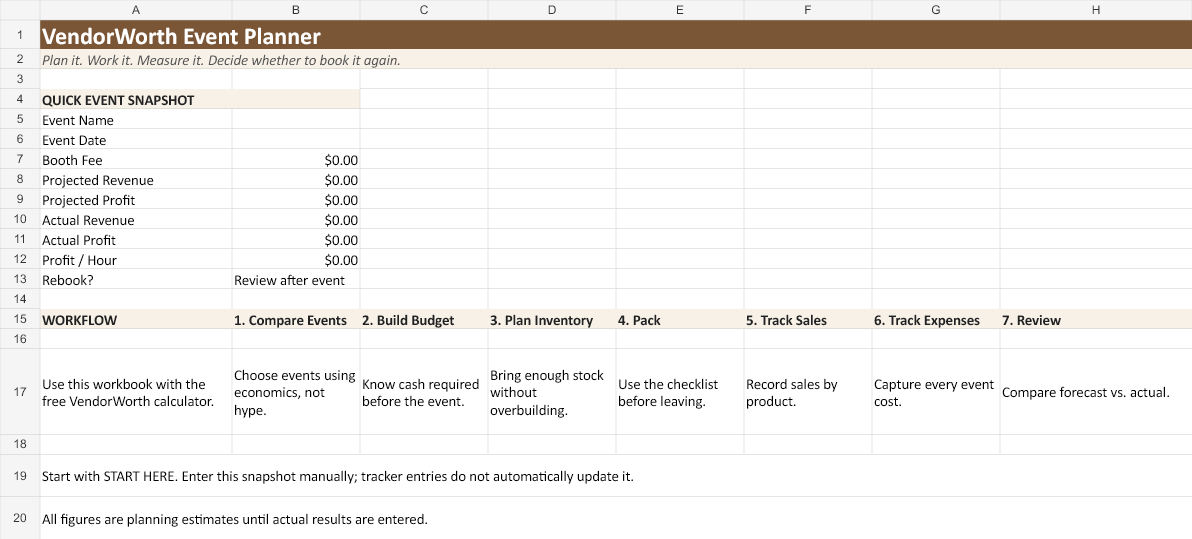
Included in the planner
✓ START HERE quick-start guide
✓ Event comparison
✓ Pre-event budget
✓ Inventory planner
✓ Packing checklist
✓ Sales & expense trackers
✓ Product performance
✓ Post-event review
✓ Annual dashboard
$9.99
One-time purchase. No subscription for the workbook.
Checkout and delivery: Purchase through DigitalLeverageLab on Etsy. Download the workbook ZIP from Etsy after payment confirmation. Microsoft Excel is required and is not included.
From “Should I book it?” to “Should I book it again?”
1. Forecast
Use the free calculator to estimate revenue, profit, break-even sales, inventory, and profit per hour.
2. Plan
Use the Event Planner to prepare the budget, inventory, packing, and event comparison.
3. Measure
After the event, enter actual sales, expenses, hours, and product performance so future decisions improve.
Questions before you book
Is VendorWorth only for craft fairs?
No. The planning model can be used for craft fairs, pop-ups, farmers markets, maker markets, and similar vendor events.
Does VendorWorth guarantee that an event will be profitable?
No. Results are estimates based on the assumptions entered. Attendance, weather, customer behavior, product mix, fees, and other conditions can change actual results.
Do I need the paid planner to use the calculator?
No. The calculator is designed to remain useful on its own. The planner is for sellers who want to plan, track, compare, and review events in more detail.
Why track profit per hour?
Two events can produce similar profit while requiring very different amounts of preparation, travel, and selling time. Profit per hour gives you another useful comparison point.